3.3
Paid
Microsoft Word
Download Microsoft Word for Windows: The iconic word processor is ready for action
Kaizen OCR & PDF is a Windows desktop application designed to help users extract text, manage documents, and work efficiently with images and PDF files—all completely offline. Built using C# WinForms, the software focuses on speed, privacy, and simplicity while offering a wide range of PDF and OCR tools in a single interface.
The software comes in FREE and PRO versions. The free version allows users to try all features with a limit of 7 uses per feature, while the PRO version removes all restrictions.
Key Features
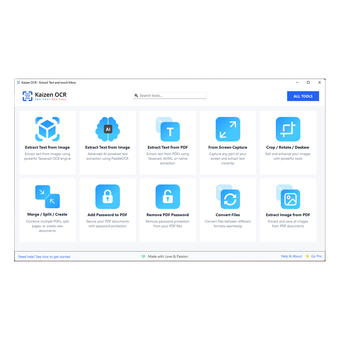
1. Extract Text from Images (OCR)
Kaizen OCR & PDF supports two OCR engines:
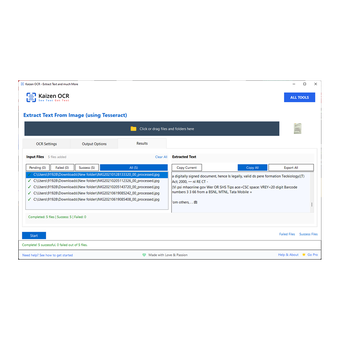
Traditional OCR using Tesseract
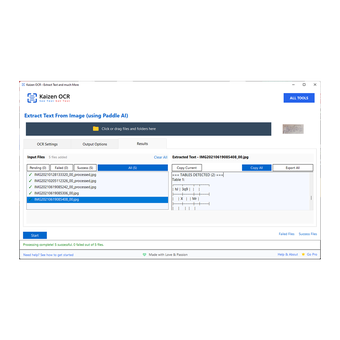
Offline AI-based OCR for improved accuracy, multilingual support, and structured data extraction (tables, key–value pairs, lists)
Users can import individual images or entire folders with full batch processing capabilities. Additional options include multi-language OCR (100+ languages), preprocessing tools (grayscale, upscaling, denoising, deskew, thresholding), and configurable output formats.
2. Extract Text from PDFs
The application supports both searchable PDFs (direct text extraction) and scanned PDFs (OCR mode). Users can choose between the standard OCR engine or the offline AI model depending on document quality. Multi-language OCR and reusable preprocessing steps are available as well.
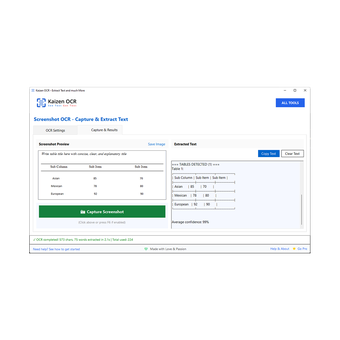
3. Screenshot OCR
Kaizen OCR includes a built-in snipping tool and an optional F6 shortcut to capture any part of the screen and extract text instantly. OCR engine and language can be configured as needed.
4. Document Management
This module lets users organize PDFs and images and perform content-based search across them. Documents can be manually added or auto-indexed from folders. Tagging and fast retrieval make large document collections easier to manage.
5. Crop, Rotate & Deskew
This tool auto-detects document borders and corrects perspective issues using AI. It is especially useful for mobile-captured document photos. Output size can be customized (A4, Legal, etc.), and batch processing is supported.
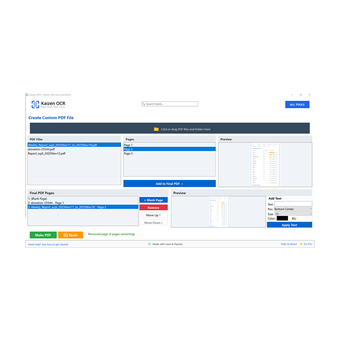
6. Merge, Split & Create PDFs
Users can combine pages from multiple PDFs, reorder them, insert blank pages, and add custom text annotations before generating a final PDF.
7. Add or Remove PDF Passwords
Kaizen OCR & PDF allows:
Adding password protection to multiple PDFs at once (with strong/standard encryption)
Removing passwords, provided the user knows the original password
Both features support batch operations and custom output folders.
8. File Format Conversion (13 Formats Supported)
Files can be converted between formats such as PDF, DOCX, DOC, RTF, TXT, ODT, EPUB, PNG, JPG, TIFF, BMP, and GIF. Users choose the source and target formats and process multiple files at once.
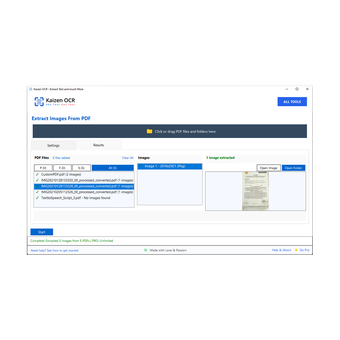
9. Extract Images from PDFs
The software can extract all embedded images from PDFs in PNG, JPG, TIFF, or BMP format, again with full batch capabilities.
Privacy & Offline Use
All features work 100% offline. No files, text, or metadata leave the user’s computer. This makes Kaizen OCR & PDF suitable for sensitive or confidential documents.
Ease of Use
Drag-and-drop support across all modules
Progress bars, status messages, and live results
Clean UI with a central home screen for navigation
Batch support for every feature
Full
1.0.20
Windows
Windows 10
English
10
272.72 MB
Have you tried Kaizen OCR & PDF? Be the first to leave your opinion!
Add reviewDownload Microsoft Word for Windows: The iconic word processor is ready for action

Ultimate tool for modern data visualization and analysis

Download Microsoft PowerPoint for Windows for free – the popular slideshow software is ready to create in Microsoft 365

An open-source office suite for free

Download Microsoft Word 2016: Document creation made easy
Download Microsoft Word for Windows: The iconic word processor is ready for action
Ultimate tool for modern data visualization and analysis
Download Microsoft PowerPoint for Windows for free – the popular slideshow software is ready to create in Microsoft 365

A free and feature-rich PDF editor
Download Microsoft Word 2016: Document creation made easy
Download Microsoft Word for Windows: The iconic word processor is ready for action
Ultimate tool for modern data visualization and analysis
Download Microsoft PowerPoint for Windows for free – the popular slideshow software is ready to create in Microsoft 365
Download Microsoft Word 2016: Document creation made easy

Download Microsoft Excel 2016 for free – now part of Microsoft 365
Paid
Download Microsoft Word for Windows: The iconic word processor is ready for action
Paid
Ultimate tool for modern data visualization and analysis
Paid
Download Microsoft PowerPoint for Windows for free – the popular slideshow software is ready to create in Microsoft 365
Paid
Download Microsoft Word 2016: Document creation made easy

Paid
Microsoft Office for Windows: All-in-one productivity suite
Download Microsoft Word 2016: Document creation made easy
Download Microsoft Excel 2016 for free – now part of Microsoft 365
Download Microsoft PowerPoint 2016 for Windows – The popular slideshow software is ready for action

Free Office Tool for Businessmen

A Free XLS Viewing And Editing Tool For Windows

DocX Viewer: Easy-to-Use DOCX File Viewer

A trial version program for Windows, by 4dots Software.

The Elephant Office - The Perfect Place to Promote Your Business
RZ PowerPoint Converter - Convert PowerPoint presentations to video for free!
Spreadsheet Conversion Made Easy?

Get your work done in style with CoolLe Office Suite

Free Software for excel Users